7:12 PM
February 9
>Case Study
7:12 PM
Feb 9
>Case Study
Case Study
•
2025
AI Integrated
Quoting Workbench
Transforming a legacy insurance platform into an intelligent, user-centric experience for increased efficiency and ease of use
Client
Insurance
Leader
Role
Senior UX
Designer
Year
2025
Duration
3 Weeks
Overview
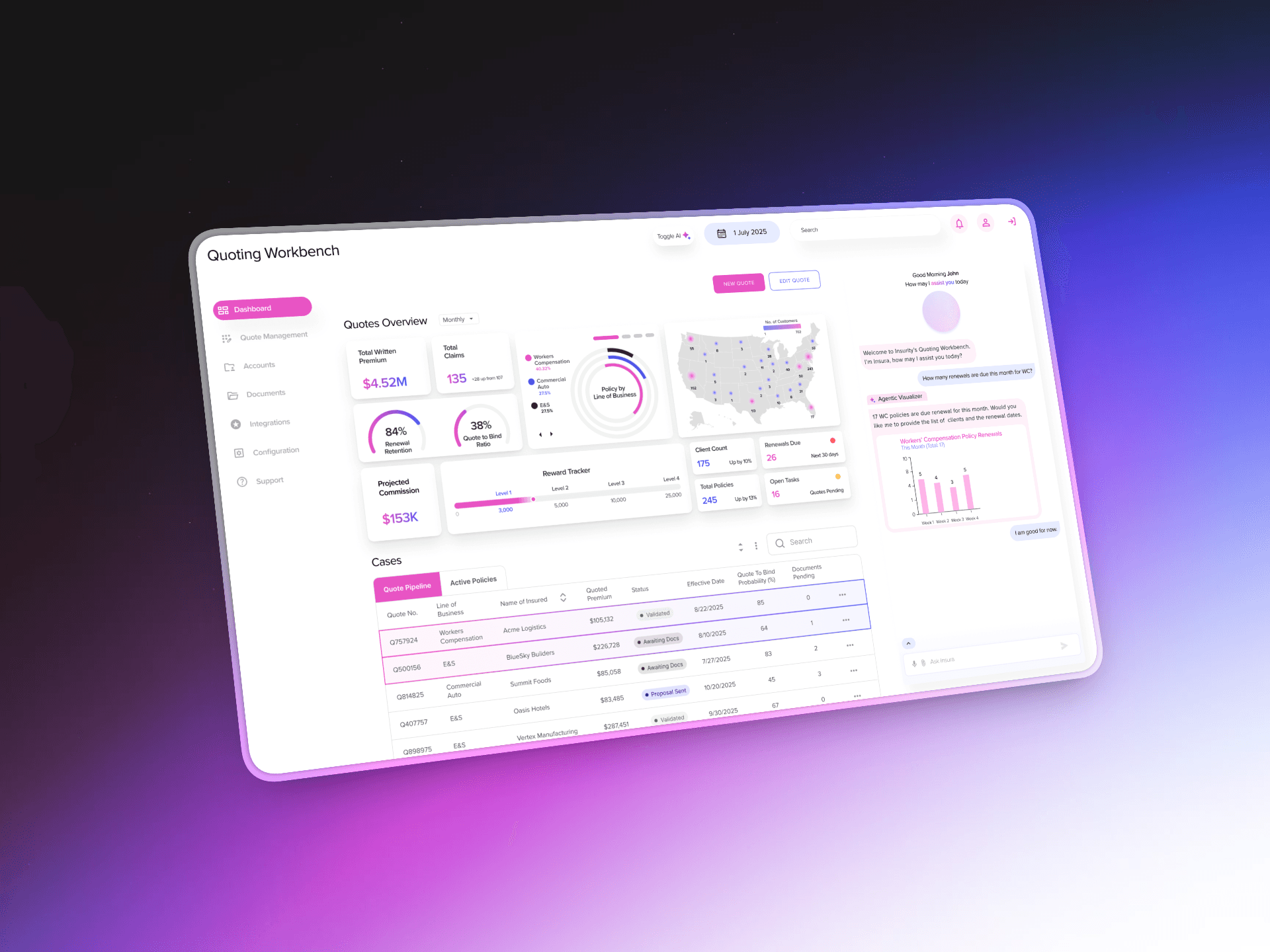
Our team designed an AI-enhanced insurance policy platform for a leading insurance provider exploring the jump from their legacy system to intelligent automation. The central tension we were navigating: how do you introduce powerful AI capabilities such as document parsing, auto-fill, predictive insights,
without overwhelming agents who've spent years perfecting their workflows?
And here's the kicker: We had to do this without direct access to the actual users.
Working with significant constraints (no end-user research access, tight timeline, POC uncertainty about whether this would ever ship), I proposed an approach centered on respectful and purposeful AI: automation that enhances rather than replaces professional expertise.
The solution was an AI toggle framework paired with sectioned workflow architecture that let users choose their level of AI assistance.
Scope
UX Design
Product Strategy
Problem Solving
UX Research
Prototyping
AI Integration
Design System
OUtcome
Key Results
Q2
Project of Quarter Winner
Insurance
Secured Client Engagement
~28%
Est. Design System ROI
The Challenge
Designing AI adoption, not AI imposition
Legacy System Dependency
Insurance agents were accustomed to manual processes developed over years of use. so naturally a new interface would run the risk of adoption
AI Adoption Anxiety
Risk of overwhelming users with too many AI-powered features at once and
skepticism/concerns from professionals regarding automated
Information Overload
Insurance quoting already involves overwhelming amounts of data entry and adding AI features could make the interface feel more complex than simpler
Workflow Disruption Risk
One-size-fits-all AI implementation would likely fail with diverse user base and user scenarios
Project Constraints
Design Under Constraints
No Direct User Access
Client security (and POC) prevented interviewing actual agents, requiring alternate creative research approaches
Tight Timeline
Compressed schedule meant ruthless prioritization of what to
design versus what to defer
Modular Requirement
Everything built with reuse in mind since our innovation lab operates on building once and adapting across projects
POC Uncertainty
Building production level work without knowing if it would ship, while ensuring components could be extracted for reuse
Discovery & Insights
Building deep understanding through creative
research under constraints
Not having direct user access can be frustrating, but we opted for a comprehensive approach: two hours with the legacy system team getting a masterclass in agent workflows, subsequent conversations with the client reps who are familiar with the end-user, secondary research on AI adoption and a competitive analysis with other quoting tools
User Autonomy is Non-Negotiable
Experienced agents resist systems that make them feel managed or replaced—they only trust tools respecting their expertise
Workflow Familiarity
Years of muscle memory meant radical changes would create learning curves even if it's better
Progressive Disclosure
Allowing user to encounter features gradually enables adoption. "Everything AI all the time" - would overwhelm cautious users
Legacy System Overwhelm
The legacy system dumped form fields onto pages without indicating progress. Overwhelming, and unnecessary cognitive load on users
Solution
An AI-powered platform combining intelligent automation with human-centered design
The platform provides AI capabilities while preserving user
agency through a toggle feature, dashboard visibility and a
streamlined process for form filling.
The platform provides AI capabilities while preserving user agency through a toggle feature, dashboard visibility and a streamlined process for form filling.
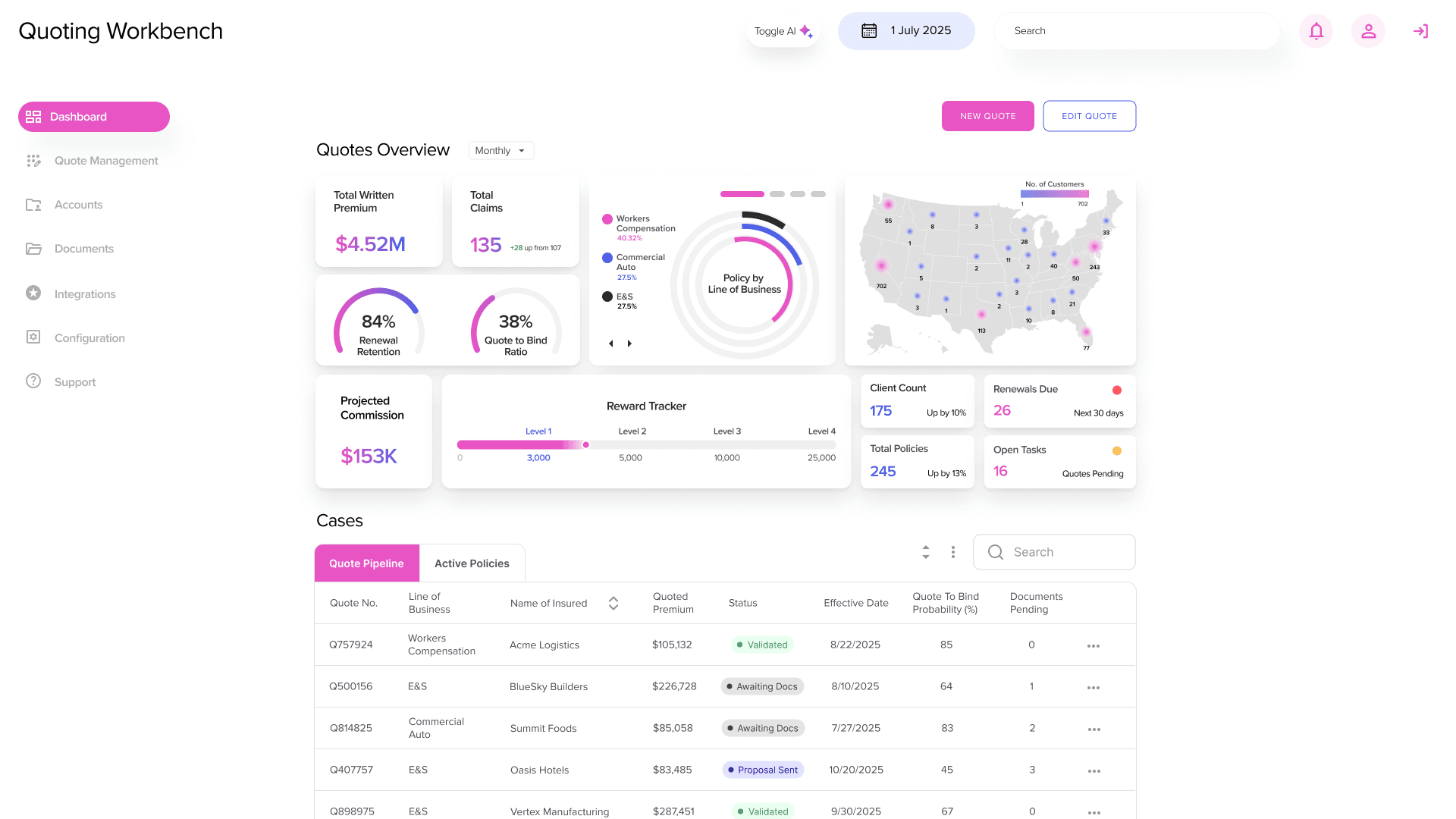
Feature 01
User Control and Data Visibility
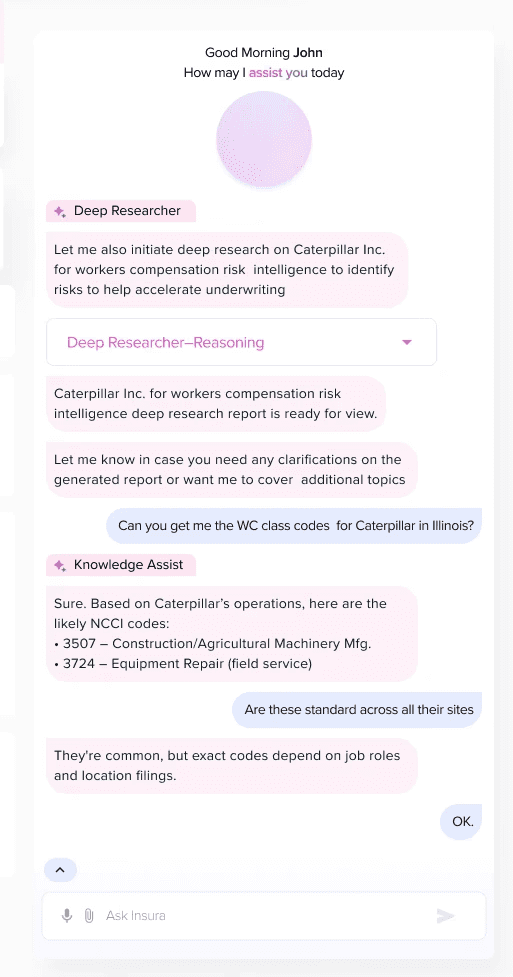
AI Toggle allows users to work entirely manually or use the AI chatbot to verify and auto-fill content, or switch between modes as needed. Contextual dashboard elements provide agents with performance metrics, quote completion patterns, and workload visibility without requiring navigation to separate reporting tools.
Feature 02
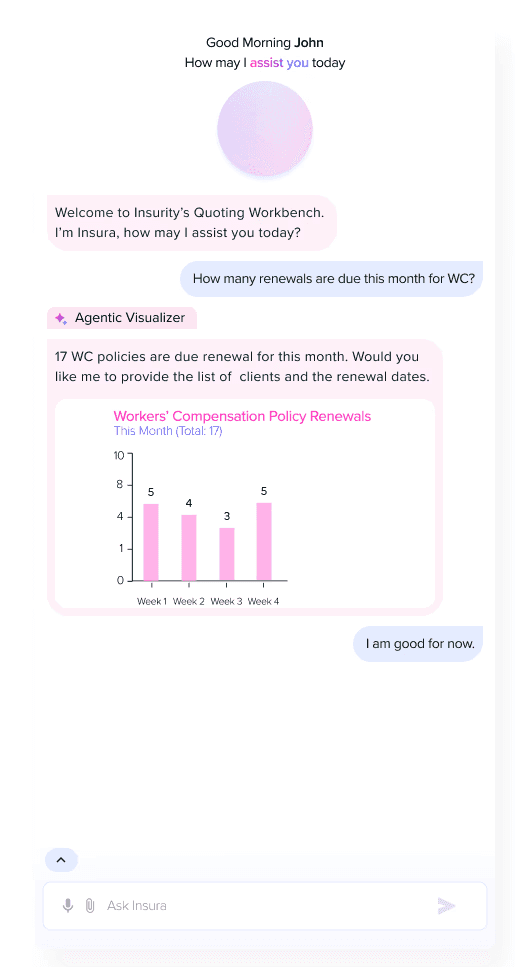
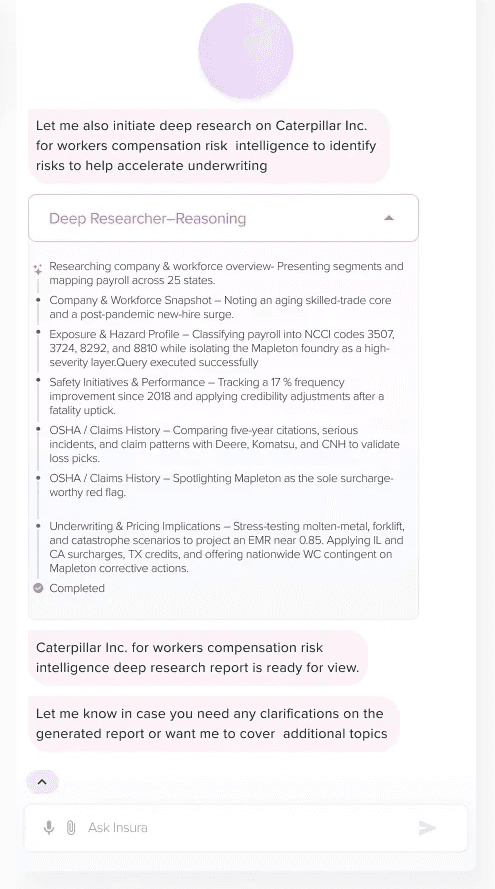
In-House AI Chat Assistant
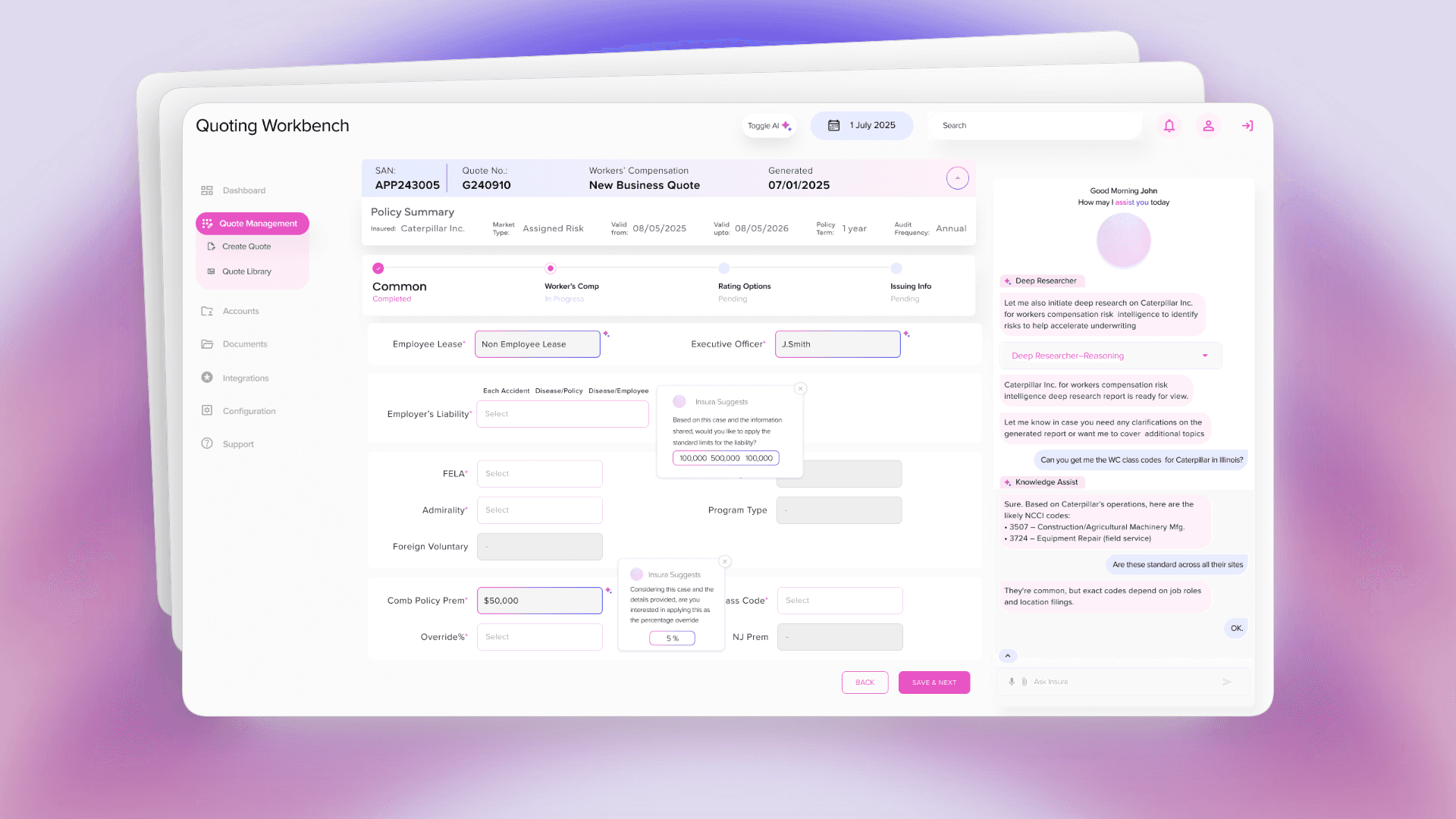
With an in-house chat assistant, we aim to provide users with assistance on any questions regarding insured companies. Our built in AI tools such as Deep Researcher, Agentic Visualizer aim to assist users on any impromptu questions or doubts and provide accurate answers instantly.
Feature 03
Streamlined Document & Data Entry
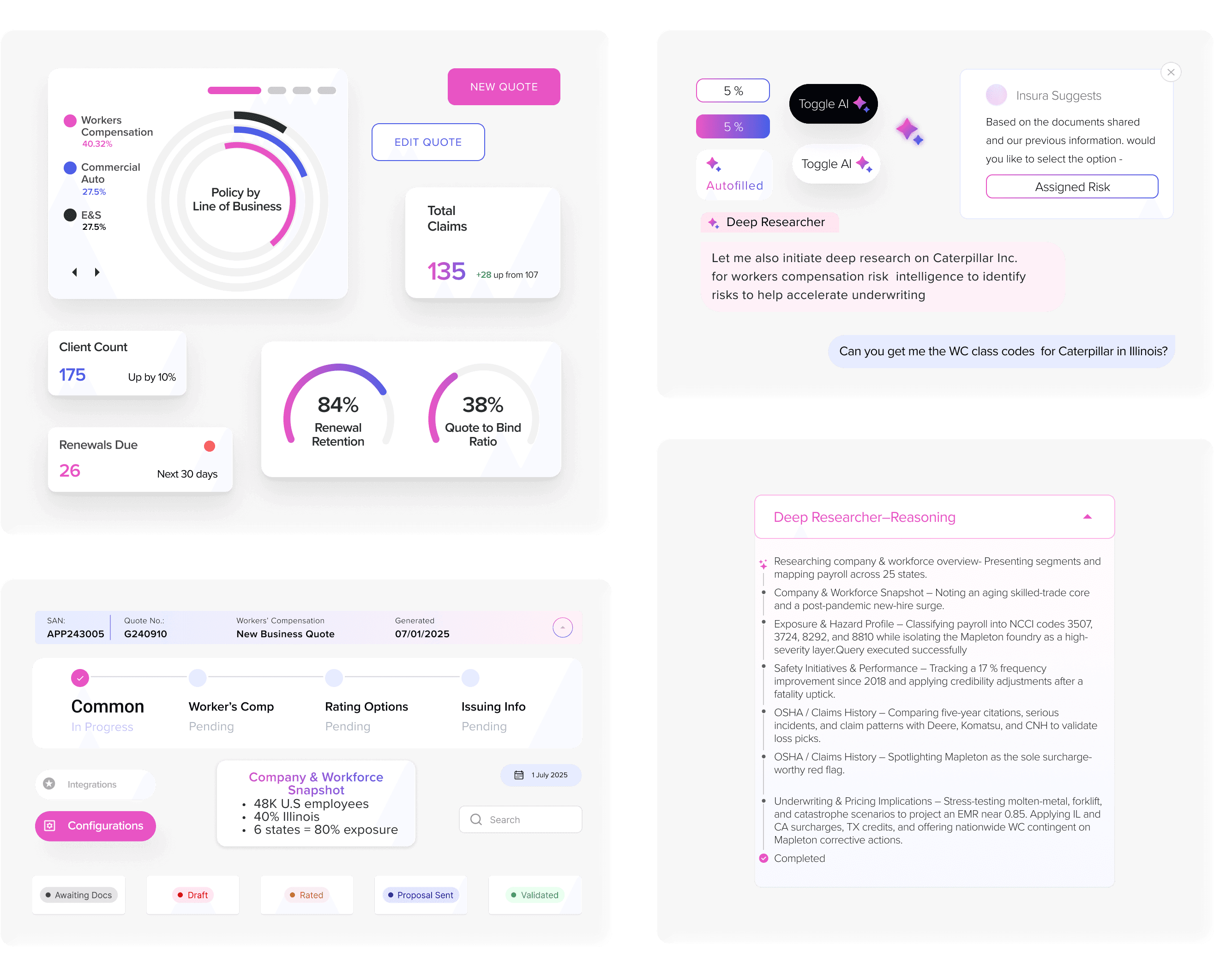
Instead of facing walls of form fields with no organization, agents now work through logical sections (with auto-fill and smart form suggestions) with clear progress tracking. The progress bar reduces the "where am I?" cognitive overhead and making voluminous data entry actually manageable.
Design System
Strategic Modularity
Established reusable patterns for AI interaction elements and dashboard component that have become valuable additions to our growing design system. These patterns now serve as starting points for any project requiring AI features or data-heavy interfaces, reducing work hours considerably.
Results
From demonstration to organizational standard
The toggle framework got validated by stakeholders and earned Project of the Quarter. Client reps praised the project, found the AI integration thoughtful, leading to further engagement for our Insurance vertical.
The strategic modularity our project proved its value through rapid reuse. Our subsequent projects inherited core patterns, dramatically reducing design timelines while maintaining quality. The toggle framework became a valuable precedent for AI patterns and influenced how our teams think about respectful automation in professional tools.
REFLECTION
How I'd do things differently
Advocate for lightweight validation earlier, even in a POC context. While full user research wasn't realistic, I could have pushed for brief walkthroughs with the prototype: having client reps or the legacy team test and react in real-time to clarify any gaps that may have been missed.
The master toggle works for now, but for a production version, it should adapt to real usage patterns. If agents use auto-fill but avoid the chatbot, that signals need for granular controls. If complex quotes need manual while routine ones benefit from AI, that suggests context-aware defaults. I built the foundation, but lacked the usage data to inform these decisions.
Biggest learning? The constraints forced strategic thinking. Limited access pushed creative research. Tight timelines forced prioritization. Nonetheless, every component created still generates value—infrastructure, not just disposable work. The project went through development to showcase both capabilities in the flesh as well as the art of possible.
Skills Applied
AI/ML Design Patterns
Enterprise UX
Design Systems
User Research
Prototyping


Hey there, access my portfolio
your desktop for better viewing :)
Hey there, access my portfolio on
your desktop for better viewing :)
Hey there, access my portfolio on
your desktop for better viewing :)